

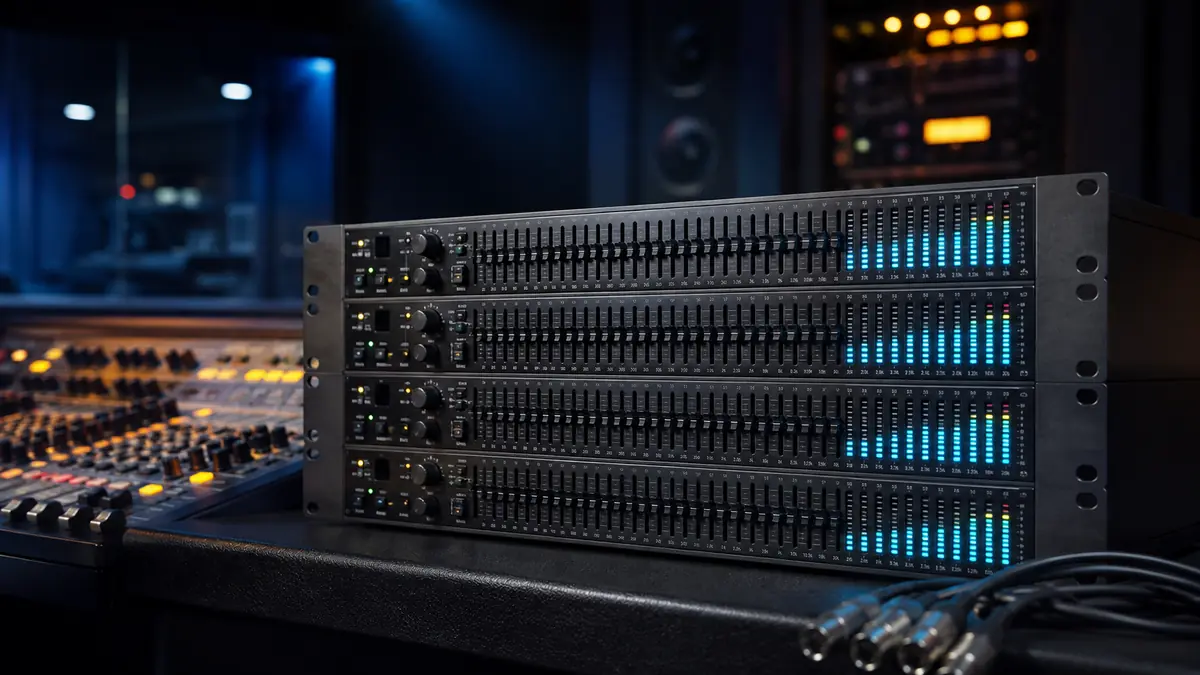
A sound system can have powerful speakers, capable amplifiers, and a good mixing console yet still sound harsh, muddy, or prone to feedback. The room and signal path often change the frequency balance before the audio reaches the listener.
A quad equalizer is a four-channel audio processor that independently adjusts selected frequency ranges in four signals. Depending on the design, it may use graphic or parametric filters. Professional models can also provide real-time analysis, high-pass and low-pass filters, channel linking, presets, and feedback-detection tools.
The term is sometimes used loosely, so understanding what “quad” means is the first step.
What Is a Quad Equalizer?
In professional audio, a quad equalizer normally means an equalizer with four independent processing channels. Each channel can shape the frequency response of one audio signal without changing the other three.
For example, the channels might process:
- Left main speaker
- Right main speaker
- Front-fill speaker
- Stage monitor
Alternatively, two channels could handle a stereo front-of-house mix while the remaining two process separate monitor mixes.
The word “quad” describes the number of signal channels, not necessarily the number of adjustable frequency bands. A device can be a four-channel equalizer with 30 bands on every channel. A four-band EQ, by contrast, may have only one audio channel divided into four frequency-control sections.
| Term | What it usually means |
|---|---|
| Quad equalizer | Four independently processed audio channels |
| Four-band equalizer | Four adjustable frequency sections |
| Stereo equalizer | Two channels, normally left and right |
| 30-band graphic EQ | Thirty fixed-frequency filters per channel |
| Quadraphonic EQ | Equalization for four-speaker surround reproduction |
Always check the channel count and filter architecture rather than relying on the product name alone.
How a Quad Equalizer Changes Sound
Equalization changes the level of selected frequencies within an audio signal. It does not simply make the entire signal louder or quieter.
The audible spectrum is commonly described as extending from approximately 20 Hz to 20 kHz, although hearing sensitivity and practical loudspeaker output vary. An equalizer divides this range into bands that can be boosted or cut.
Typical frequency regions include:
| Frequency range | Common perception | Frequent problems |
|---|---|---|
| 20–60 Hz | Sub-bass, deep impact | Rumble and wasted amplifier power |
| 60–250 Hz | Bass and warmth | Boominess or excessive weight |
| 250–500 Hz | Lower midrange | Muddy or boxy sound |
| 500 Hz–2 kHz | Midrange definition | Nasal or congested tone |
| 2–5 kHz | Presence and intelligibility | Harshness and listening fatigue |
| 5–10 kHz | Clarity and detail | Sibilance or brittle sound |
| 10–20 kHz | Air and brilliance | Hiss or excessive brightness |
A filter usually has three relevant properties:
- Frequency: the center or boundary of the affected range
- Gain: the amount of boost or cut, measured in decibels
- Q or bandwidth: how narrowly or broadly the adjustment acts
High-Q filters affect a narrow range. Low-Q filters create wider, smoother changes. On a conventional graphic equalizer, the center frequencies are fixed and the slider positions control gain. The filter bandwidth may be fixed or may change according to the equalizer’s design.
Quad Equalizer vs. Four-Band EQ
These terms are frequently confused because both involve the number four.
A four-band EQ divides one signal into four broad frequency sections, often labeled low, low-mid, high-mid, and high. It is common on mixing consoles, amplifiers, car-audio processors, and software plugins.
A quad equalizer processes four complete signals. Each of those channels may contain four, 15, 30, or more bands.
Think of the distinction this way:
- Four-band tells you how many frequency areas can be adjusted.
- Quad-channel tells you how many separate signals can be processed.
A four-band EQ is useful for broad tonal shaping. A four-channel, 30-band graphic equalizer offers much finer control across several speaker feeds or signal paths.
Graphic and Parametric Quad Equalizers
The control method determines what kinds of corrections the processor can make.
Graphic Equalization
A graphic equalizer provides a row of fixed-frequency controls. The position of the sliders or LED indicators creates a visual representation of the EQ curve.
A 30-band design typically places its frequency centers approximately one-third of an octave apart. This allows relatively precise adjustment across the audible range.
Graphic equalizers work well for:
- Live sound system tuning
- Monitor-ring control
- Broad room-response correction
- Fast adjustments during an event
- Repeatable speaker-system settings
Their main limitation is that the filter frequencies are predetermined. If a problematic resonance sits between two bands, the correction may affect a wider region than necessary.
Parametric Equalization
A parametric equalizer lets the operator select frequency, gain, and Q. It can target a resonance more precisely than a fixed-band graphic processor.
Parametric EQ is commonly preferred for:
- Narrow feedback frequencies
- Vocal resonances
- Instrument tone shaping
- Corrective studio work
- Speaker and room calibration
Some digital quad equalizers combine graphic controls with variable high-pass filters, low-pass filters, or additional parametric sections.
Constant-Q and Adaptive-Q Designs
With a constant-Q graphic EQ, each filter maintains a broadly consistent bandwidth as its gain changes. Multiple adjacent boosts can interact and create a curve that is not as simple as the control display suggests.
An Adaptive-Q design changes filter behavior according to the amount and pattern of adjustment. Its purpose is to make the resulting frequency response more closely follow the displayed curve while reducing unwanted interaction between adjacent filters.
Neither architecture automatically guarantees good sound. Filter implementation, converter quality, headroom, noise performance, and operator decisions still matter.
The Mackie Quad EQ as a Practical Example
One of the best-known products associated with the phrase is the Mackie Quad EQ, a discontinued professional rackmount processor developed from technology related to Mackie’s TT24 digital mixer platform.
It combines four channels of 30-band Adaptive-Q graphic equalization with an interface designed for live sound. Its principal features include:
- Four independent audio channels
- Thirty EQ bands per channel
- Adaptive-Q filter processing
- High-pass and low-pass filters
- Real-time analyzer functionality
- Measurement-microphone input
- Pink-noise generator
- Sound pressure level metering
- Simultaneous EQ and RTA display
- Snapshot storage and recall
- Channel linking
- Bypass and level controls
Its LED ladders can display the selected EQ curve and real-time frequency information together. This allows an engineer to compare the settings with the measured or input signal.
The processor is now primarily encountered on the used-equipment market. That makes condition, display operation, encoder response, connectors, memory functions, and included accessories particularly important when assessing a unit.
Not every product described as a quad equalizer is a Mackie device. The same phrase also appears in electronics and data communications, where a quad equalizer may compensate for signal loss across four high-speed digital channels. Context determines whether the term refers to audio-frequency processing or transmission-line equalization.
Where Four-Channel Equalization Is Useful
Four channels provide flexible routing without requiring two separate stereo processors.
Front-of-House and Fill Speakers
Channels one and two can process the main left and right outputs. Channels three and four can handle delay speakers, front fills, balcony feeds, or another coverage zone.
Because each speaker group interacts differently with the room, independent processing can improve consistency across the venue.
Stage Monitors
Four monitor mixes may need different corrections. A wedge near a reflective wall can behave differently from one placed in open space, even when both use the same loudspeaker model.
Independent EQ also helps address microphone and monitor interactions without unnecessarily altering the main mix.
Multi-Zone Installations
Restaurants, houses of worship, conference facilities, and performance spaces often send audio to several zones. Separate equalization can compensate for different speakers, mounting positions, surfaces, and listening distances.
Studio Monitoring
A quad unit can process two stereo monitoring paths or a main pair plus additional cue feeds. Corrective monitoring EQ should be applied conservatively because aggressive room correction cannot replace acoustic treatment.
Quadraphonic Systems
A four-channel processor can be used with front-left, front-right, rear-left, and rear-right signals. However, having four channels does not mean the device can decode historical quadraphonic formats such as SQ. It only means it can equalize four signals that have already been separated.
How to Set Up a Quad Equalizer
Good equalization starts with proper gain structure, speaker placement, and measurement. EQ should be used to refine a working system, not disguise fundamental faults.
1. Reset the Processor
Begin with all bands at 0 dB, filters disengaged, and channel gains at unity. Disable any previous presets unless their purpose and origin are known.
A flat display is a neutral starting point, although it does not guarantee flat acoustic output in the room.
2. Connect the Signal Path
A common live-sound route is:
Mixer output → equalizer input → amplifier or powered-speaker input
Connect each output to the corresponding input and label all four channels. Balanced XLR or TRS connections are preferable where supported because they reduce susceptibility to interference over long cable runs.
Power equipment on in signal-flow order, with amplifiers or powered speakers last. Reverse that order when shutting down.
3. Establish Gain Structure
Set the mixer, processor, and speaker input levels so that no stage clips while the system produces the required output. Watch meters during realistic program peaks rather than testing only at a low level.
Excessive input level can overload the equalizer. Excessive output gain can overload the next device. Both problems may sound like harshness, but frequency adjustments will not correct them.
4. Apply High-Pass and Low-Pass Filters
A high-pass filter removes content below its cutoff frequency. It can reduce handling noise, stage vibration, wind noise, and low-frequency energy that a speaker cannot reproduce effectively.
A low-pass filter removes content above its cutoff. It may be useful in specialized speaker feeds or for controlling unwanted high-frequency noise.
Select slopes and cutoff points according to the source and speaker system. Do not assume one setting fits every channel.
5. Listen Before Measuring
Play familiar, well-recorded reference material and walk through the listening area. Identify whether a problem is consistent or limited to one location.
A severe change in only one seat is often caused by acoustic interference. Applying a large global EQ correction for that seat may make the rest of the room worse.
6. Use the Real-Time Analyzer Carefully
An RTA shows the energy present in frequency bands. With a calibrated measurement microphone and pink noise, it can reveal broad imbalances and resonances.
Place the microphone in representative listening positions, not directly against a wall or in a corner unless those locations are specifically being evaluated. Take several measurements and look for repeatable patterns.
The goal is not necessarily a perfectly flat visual trace. Loudspeaker directivity, room acoustics, measurement position, and the preferred target curve all affect the appropriate response.
7. Cut Problem Frequencies Conservatively
Reducing an excessive frequency is usually safer than applying a large boost elsewhere. Start with small changes of approximately 1–3 dB and listen again.
Large adjacent cuts may indicate a speaker-placement, crossover, polarity, or room-acoustics problem rather than an EQ problem.
8. Match Related Channels
For a stereo system, link or match the left and right channels initially. Independent adjustments may be justified when the speakers occupy acoustically different positions, but unnecessary differences can shift the stereo image.
Monitor and fill channels should be adjusted according to their own positions and purposes.
9. Compare With Bypass
Regularly switch the equalizer in and out of bypass at a matched listening level. Louder often seems better, so level differences can mislead the comparison.
If the processed sound is thinner, less natural, or only louder, reconsider the curve.
10. Store and Document the Settings
Save a snapshot when the processor supports preset recall. Record the date, room layout, speaker positions, microphone configuration, and purpose of each preset.
A setting created for an empty venue may not be ideal after the audience arrives. People absorb sound, particularly in the midrange and high frequencies, so final adjustments should reflect actual operating conditions.
Using a Quad Equalizer to Control Feedback
Feedback occurs when sound from a speaker returns to a microphone, is amplified again, and completes a loop with enough gain at a particular frequency.
An equalizer can increase gain before feedback by reducing the dominant resonant frequencies, but it cannot compensate indefinitely for poor system geometry.
A practical method is:
- Set microphones and monitors in their working positions.
- Start with the EQ flat.
- Raise the relevant mix gradually.
- Identify the first frequency that begins to ring.
- Apply a narrow, modest cut.
- Repeat only until the required operating level is reached.
- Stop if the overall tone begins to deteriorate.
An RTA can help locate a ringing frequency, but listening remains necessary. The tallest analyzer band may be part of the intended program rather than feedback.
First improve microphone choice, polar-pattern orientation, speaker placement, performer distance, and stage volume. EQ works best after those variables are controlled.
Common Quad Equalizer Mistakes
Boosting Too Many Bands
Multiple boosts consume headroom and can drive the output into clipping. If most bands need to be raised, reduce the unwanted areas and adjust the overall level instead.
Creating a “Smile” Curve Automatically
Boosting bass and treble while cutting the middle may sound impressive briefly, but it can reduce vocal intelligibility and exaggerate room problems. Shape the response according to evidence rather than a familiar visual pattern.
Treating the RTA as an Autopilot
An analyzer reports energy; it does not know which sounds are desirable. Cymbals naturally create high-frequency energy, while bass-heavy music produces strong low-frequency readings.
Correcting Deep Nulls
A deep cancellation caused by reflections or opposing speakers often cannot be repaired with boost. The added power may disappear into the same cancellation while reducing system headroom.
Move the speaker or listening position, check polarity and delay alignment, or address the room instead.
Using Narrow Cuts for Broad Problems
A narrow filter is effective for a resonance. A broad tonal imbalance generally needs a broader adjustment. Matching filter width to the problem produces more natural results.
Ignoring Bypass Level
A processed signal may seem better simply because it is louder. Compare at equal perceived volume.
Copying Another Venue’s Curve
An EQ preset captures a particular combination of room, speakers, placement, audience, and measurement method. It is a starting reference, not a universal correction.
Troubleshooting a Quad Equalizer
When a channel is silent, distorted, or noisy, isolate the fault methodically.
| Symptom | Likely checks |
|---|---|
| No output | Bypass state, cables, routing, channel mute, input and output levels |
| Distortion | Clipping indicators, excessive boosts, mixer output level, damaged cable |
| Hum or buzz | Balanced connections, grounding, power distribution, cable routing |
| Unequal stereo image | Mismatched channel settings, polarity, speaker placement |
| Harsh output | Excessive upper-mid boost, clipping, loudspeaker limitations |
| Weak bass | High-pass cutoff, polarity, crossover settings, room cancellation |
| Preset does not recall correctly | Memory procedure, channel link mode, storage condition |
| RTA behaves unpredictably | Microphone input, placement, calibration, selected signal source |
Use bypass to determine whether the processor is actually causing the problem. Swap cables and channels one at a time. Changing several variables together makes the diagnosis slower.
With older digital hardware, inspect the display, controls, power supply, connectors, and memory behavior. Back up or document important presets before servicing the unit.
When EQ Is Not the Right Fix
A quad equalizer cannot repair every audio problem.
Use other solutions when the cause is:
- Poor speaker placement
- Incorrect polarity
- Delay misalignment
- Damaged drivers
- An unsuitable crossover
- Excessive room reverberation
- Mechanical vibration
- Microphone technique
- Inadequate amplifier or speaker capacity
- Low-quality or clipped source material
Acoustic treatment handles reflections and decay. Delay processing aligns speakers in time. Crossovers distribute frequencies between drivers. Compression controls dynamic range. EQ addresses frequency balance; it should not be expected to perform the other jobs.
Hardware vs. Software Equalization
Modern digital mixing consoles and loudspeaker-management processors often include several EQ channels internally. This can make a dedicated rackmount quad equalizer unnecessary. Software resources can provide additional guidance on digital tools, applications, and related technology.
| Hardware quad equalizer | Software or console EQ |
|---|---|
| Direct physical controls | Compact, recallable interface |
| Easy to place in an analog signal path | Often includes parametric and dynamic EQ |
| Independent of a computer | Can integrate with scenes and remote control |
| Useful with older systems | May provide more measurement and routing tools |
| Adds cables and conversion stages | Depends on the host device or software |
| Older units may require maintenance | Menus can slow emergency adjustments |
A standalone unit remains useful when immediate front-panel access, four independent analog paths, or compatibility with an existing rack is important. Integrated processing is often more convenient when the system already uses a capable digital mixer. Readers exploring modern technology can also use independent resources for practical digital guides and explainers.
Is a Quad Equalizer Worth Using?
A quad equalizer is valuable when four separate signals need independent frequency control. Its strongest applications include live sound, stage monitors, multi-zone installations, speaker-system tuning, and four-channel playback systems.
The number of bands matters less than how accurately and carefully they are used. A 30-band processor offers detailed control, but unnecessary adjustments can reduce headroom and make the system less natural.
Start flat, establish clean gain structure, correct placement and routing problems, measure representative positions, and make small cuts before considering boosts. Used this way, a quad equalizer can improve clarity, consistency, and feedback stability across several audio channels without forcing every output to share the same tonal correction.
