

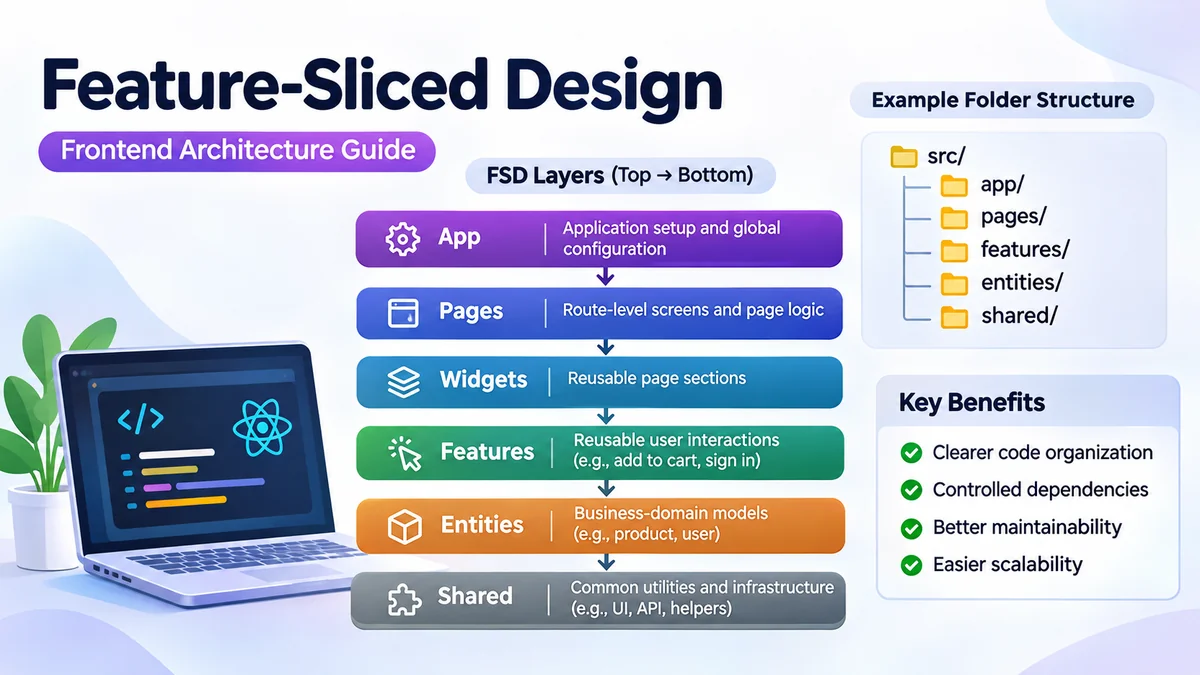
As frontend applications grow, keeping code organized becomes increasingly difficult. Components, API requests, state management, and business logic can become scattered across dozens of directories, making even small changes harder than necessary.
The feature sliced approach addresses this problem by organizing application code around meaningful business capabilities and clearly defined architectural boundaries.
feature sliced refers to a frontend architecture approach commonly known as Feature-Sliced Design (FSD). It organizes application code using layers, domain-focused slices, and technical segments. This structure helps developers manage dependencies, improve code maintainability, and keep related functionality together as applications become more complex. Feature-Sliced Design+1
What Is feature sliced Architecture?
Feature-Sliced Design is an architectural methodology for structuring frontend applications according to their responsibilities and business domains.
Instead of organizing everything exclusively by technical type, such as components, hooks, services, and utilities, FSD introduces boundaries that reflect how an application actually works.
Consider an e-commerce application.
A conventional folder structure might contain a central components directory with hundreds of unrelated components, while product-related API functions and state management live elsewhere.
A feature-oriented architecture makes it easier to identify code associated with activities such as adding products to a cart, managing authentication, or editing a profile.
The methodology is not a JavaScript framework or an npm dependency that must be installed. It is a set of architectural conventions that can be applied to different frontend technologies.
The Three Core Concepts
Feature-Sliced Design uses three organizational concepts:
| Concept | Purpose | Example |
|---|---|---|
| Layers | Define architectural responsibility | app, pages, shared |
| Slices | Group code by business domain | product, user, cart |
| Segments | Separate technical responsibilities | ui, api, model |
These concepts work together to create a predictable project structure.
A layer determines the scope of responsibility. A slice identifies a meaningful domain or feature. A segment organizes the implementation details inside that slice. Feature-Sliced Design
How feature sliced Architecture Works
The central principle of FSD is that application modules should have understandable responsibilities and controlled dependencies.
A commonly illustrated structure includes six layers.
Feature-Sliced Design layer hierarchy
App
Application initialization and global configuration
Pages
Route-level screens and page-specific logic
Widgets
Reusable page sections
Features
Reusable user interactions
Entities
Business-domain models
Shared
Reusable infrastructure and utilities
Dependencies generally flow downward. Not every application needs every layer.
1. App Layer
The App layer contains application-wide configuration and initialization.
Typical responsibilities include routing setup, global providers, error boundaries, application styles, and dependency injection.
Because these responsibilities affect the entire application, they belong at the highest architectural level.
2. Pages Layer
The Pages layer represents application screens associated with routes.
Examples include a home page, product details page, checkout page, and user profile page.
Modern FSD guidance recommends starting with pages and keeping page-specific functionality there until a genuine reuse requirement emerges.
This approach reduces unnecessary abstraction and makes code easier to locate. GitHub
3. Widgets Layer
Widgets represent substantial interface sections that may be reused or composed within pages.
Examples include navigation headers, product grids, and dashboards.
However, widgets are optional. A large interface section used by only one page may be better kept inside that page rather than extracted prematurely.
4. Features Layer
The Features layer represents reusable interactions that deliver meaningful user functionality.
Examples include:
- Signing in to an account
- Adding an item to a shopping cart
- Submitting a product review
- Updating account preferences
A feature can contain its interface, interaction state, validation, and API integration.
Not every button or interaction requires a separate feature slice.
5. Entities Layer
Entities represent meaningful business concepts, such as users, products, orders, and articles.
An entity slice may contain data types, reusable presentation components, and domain-related logic.
For example, a product entity might provide a product type definition, a product card, and data transformation utilities.
The Entities layer is optional, especially in applications where domain abstractions would add complexity without meaningful reuse.
6. Shared Layer
The Shared layer contains infrastructure and reusable functionality that does not belong to a particular business domain.
Examples include UI primitives, API clients, formatting utilities, configuration, and general-purpose hooks.
A reusable Button component can belong in Shared because it does not inherently represent a specific business capability.
feature sliced Folder Structure Example
A practical way to understand the architecture is to examine how files are organized.
The following example illustrates a moderately sized React application.
src/
├── app/
│   ├── providers/
│   ├── router/
│   └── styles/
│
├── pages/
│   ├── home/
│   │   ├── ui/
│   │   └── index.ts
│   └── product-details/
│       ├── ui/
│       ├── api/
│       ├── model/
│       └── index.ts
│
├── features/
│   └── add-to-cart/
│       ├── ui/
│       ├── model/
│       └── index.ts
│
├── entities/
│   └── product/
│       ├── ui/
│       ├── model/
│       └── index.ts
│
└── shared/
    ├── ui/
    ├── api/
    └── lib/
The structure shows how different responsibilities can be separated without placing every component in one global directory.
A product details page contains its own screen-specific implementation. The reusable add-to-cart interaction lives in Features, while product-related domain code belongs in Entities.
General utilities remain in Shared.
This structure is illustrative, not mandatory. Smaller applications may need only App, Pages, and Shared.
Understanding Segments
Segments organize the technical responsibilities within a slice.
Common segment names include:
| Segment | Responsibility |
|---|---|
ui | Components and visual presentation |
api | Network requests and data access |
model | State, types, and business-related models |
lib | Internal helpers |
config | Slice-specific configuration |
Segments should reflect real implementation needs. Creating empty directories for every possible segment adds clutter rather than architectural value.
Dependency Rules in Feature-Sliced Design
One of the most important aspects of FSD is its dependency direction.
A module in a particular layer can generally import from lower layers, but should not depend directly on higher layers.
For example, a page can use a feature, and a feature can use an entity. An entity should not import a page.
Example of allowed dependency direction
Page: Product Details
Feature: Add to Cart
Entity: Product
Shared: API Client
This dependency model helps prevent circular references and reduces unexpected coupling between unrelated parts of the application.
Why Same-Layer Imports Matter
Slices within the same layer are generally intended to remain independent.
For example, one feature should not freely import implementation details from another feature.
If two features need common functionality, developers should examine whether that functionality belongs in a lower layer or whether the original separation is appropriate.
FSD also supports explicit cross-import mechanisms for certain entity relationships, rather than encouraging unrestricted imports.
These rules make dependencies easier to understand and architectural changes more predictable. GitHub+1
Public APIs and Module Encapsulation
A public API defines which parts of a slice are available to other parts of the application.
In a TypeScript project, an index.ts file commonly serves as the public entry point.
For example:
// features/add-to-cart/index.ts
export { AddToCartButton } from "./ui/AddToCartButton";
Another module can then import the feature through its public interface:
import { AddToCartButton } from
  "@/features/add-to-cart";
This is preferable to reaching into internal implementation files:
// Avoid deep imports into another slice
import { AddToCartButton } from
  "@/features/add-to-cart/ui/AddToCartButton";
Public APIs create a stable boundary between modules.
Developers can reorganize internal files without requiring every consuming module to change its import paths.
They also make it clearer which components and functions are intended for reuse.
feature sliced vs Traditional Frontend Architecture
Traditional frontend structures frequently group files according to their technical purpose.
For example:
src/
├── components/
├── hooks/
├── services/
├── stores/
├── utils/
└── types/
This approach is straightforward and can work well for small applications.
However, as the project grows, the code for a single business interaction may become scattered across multiple directories.
Feature-Sliced Design introduces domain-oriented boundaries to address that problem.
| Factor | Traditional structure | Feature-Sliced Design |
|---|---|---|
| Organization | Primarily by file type | By responsibility and domain |
| Business logic | Often spread across folders | Can stay close to related UI |
| Dependencies | Project-specific conventions | Explicit architectural rules |
| Initial setup | Usually simpler | Requires architectural decisions |
| Large-project navigation | Depends on conventions | Domain boundaries can improve navigation |
| Reusability | Often based on shared folders | Guided by actual reuse and responsibility |
| Learning curve | Usually lower | Higher initially |
Neither approach automatically produces better software.
A small application with a handful of screens may be easier to maintain with a conventional structure.
FSD becomes more useful when the application has enough complexity that clearly defined responsibilities and dependency rules provide practical benefits.
Feature-Sliced Design vs Atomic Design
Feature-Sliced Design and Atomic Design address different architectural concerns.
Atomic Design focuses primarily on composing user interfaces from progressively larger visual components.
Its familiar concepts include atoms, molecules, organisms, templates, and pages.
FSD focuses on application architecture, business boundaries, and dependency management.
For example, Atomic Design can help developers decide how to compose a search input, filter controls, and a results panel.
FSD can help determine where the search functionality, API integration, page-specific state, and reusable business logic belong.
The two approaches are not mutually exclusive.
A project can use Atomic Design principles within its UI components while applying FSD to the broader application structure.
How to Implement feature sliced in a React Project
Adopting FSD does not require rewriting an entire application at once.
A gradual approach is usually easier to manage and less likely to introduce unnecessary complexity.
Step 1: Start With a Minimal Structure
For a new application, begin with the layers that have clear responsibilities.
src/
├── app/
├── pages/
└── shared/
Place route-specific functionality in Pages, application configuration in App, and genuinely reusable infrastructure in Shared.
Avoid adding every possible layer before the application needs it.
Step 2: Keep Related Code Together
Suppose a product details page contains product information, a quantity selector, and a purchase interaction.
If the quantity selector is only used on that page, keeping its state and components inside the page is reasonable.
There is no need to extract it into a global feature merely because it contains business logic.
Step 3: Identify Actual Reuse
Imagine the same add-to-cart interaction is now required on the product details page, a product listing page, and a recommendations section.
This is a stronger reason to extract reusable functionality.
A dedicated add-to-cart feature can provide the shared interaction while allowing each page to compose it appropriately.
Step 4: Introduce Domain Models Where Useful
As product-related logic grows, a Product entity may become valuable.
It could contain product types, reusable domain functions, and presentation components shared across multiple features or pages.
The extraction should solve a concrete problem rather than satisfy a predetermined folder structure.
Step 5: Establish Public APIs
Create clear public entry points for reusable slices.
Avoid direct imports into another slice’s internal directories.
Use consistent import aliases and document the architectural boundaries that contributors should follow.
Step 6: Enforce Dependency Rules
Architectural rules become more useful when they can be checked automatically.
The FSD ecosystem includes Steiger, an architectural linter intended to help detect structural issues.
The official project also provides a CLI for generating layers, slices, and segments. GitHub+1
Automation can help teams maintain consistency, although tools do not replace sound architectural judgment.
Using Feature-Sliced Design With Next.js and Other Frameworks
FSD is framework-independent, but its implementation must account for the conventions of the chosen technology.
React and Vite
React applications built with Vite can use a conventional src directory containing FSD layers.
Routing, global providers, and application initialization can be organized in App, while screens and reusable business functionality follow the selected layer structure.
React Router can handle navigation without changing the core dependency principles.
Next.js
Next.js introduces file-system routing and framework-specific conventions.
In the App Router, the framework’s app directory has a special meaning and should not be confused with the conceptual FSD App layer.
A practical integration keeps Next.js routing files compatible with framework requirements while locating substantial application functionality in separate architectural modules.
For example, a route file can import a page implementation from the project’s Pages layer.
The precise arrangement depends on routing, server components, client boundaries, and data-fetching requirements.
Vue and Nuxt
Vue applications can also use FSD principles to organize components, composables, state, and API interactions.
Nuxt introduces its own routing and directory conventions, so the architectural layout should accommodate those requirements rather than fight them.
The official documentation includes integration guidance for several frontend frameworks. GitHub
State Management and API Handling
A common question is where application state should live in a feature-sliced architecture.
The answer depends on the scope of the state and the responsibility of the module that owns it.
Local component state should usually remain close to the component that uses it.
Page-specific state can remain inside the page slice.
Reusable business interactions may own their state within a feature, while shared domain state can be organized around appropriate domain boundaries.
Redux and Zustand
State-management libraries such as Redux Toolkit and Zustand can work with FSD.
The architecture does not require one particular state-management solution.
Instead, developers should consider who owns the state, which modules need it, and whether exposing it creates unnecessary dependencies.
A global store should not automatically become a dumping ground for unrelated business logic.
TanStack Query and Server State
TanStack Query can manage server-state concerns such as caching, background refetching, and request status.
API interactions can remain near the pages, features, or entities that need them, while shared request infrastructure belongs in Shared.
This separation helps avoid confusing server-state management with unrelated client-side interaction state.
Common Mistakes When Using feature sliced
FSD can introduce unnecessary complexity when applied mechanically.
Several mistakes appear repeatedly in projects adopting layered frontend architectures.
Creating Too Many Layers Too Early
A developer may create App, Pages, Widgets, Features, Entities, and Shared before building the first screen.
This produces empty directories and encourages premature abstraction.
A smaller structure that grows with the application is easier to maintain.
Turning Every Button Into a Feature
Not every interactive component represents a reusable business capability.
A button that opens a page-specific modal may belong directly inside the page.
Extracting it into a feature without a clear reason can make the code harder to follow.
Moving All Business Logic Into Entities
Entities are useful for domain concepts, but they should not automatically own every piece of business logic.
Interaction-specific behavior can belong in a feature, while page-specific behavior may remain in Pages.
The appropriate location depends on responsibility and reuse.
Ignoring Import Boundaries
Even a carefully organized directory structure becomes less useful if modules freely import internal files from unrelated slices.
Deep imports, circular dependencies, and unrestricted same-layer references undermine architectural isolation.
Public APIs and dependency checks help reduce these problems.
Overusing Shared
Shared should not become a second unstructured components directory.
Business-specific functionality placed in Shared loses the domain context that FSD is intended to preserve.
Developers should distinguish genuinely general-purpose infrastructure from code that belongs to a particular business capability.
Extracting Code Based on Hypothetical Reuse
A component might be reusable someday, but that alone is not a compelling reason to move it into another architectural layer.
The current FSD approach emphasizes keeping code local until a meaningful need for extraction appears. OpenAI Suite Skills
Benefits and Limitations of Feature-Sliced Design
FSD can improve how teams reason about frontend code, but its value depends on application size, team practices, and implementation discipline.
Main Benefits
Clearer ownership: Related functionality can remain within understandable boundaries, making it easier to locate and modify.
Controlled dependencies: Layer rules reduce the risk of accidental coupling between unrelated modules.
Safer refactoring: Public APIs allow internal implementations to change without unnecessarily affecting consumers.
Better scalability: Domain-oriented organization can remain understandable as an application gains screens and functionality.
Consistent collaboration: Shared conventions help developers understand where new code should be placed.
Potential Limitations
Initial learning curve: Developers must understand layers, slices, segments, and dependency rules.
Architectural overhead: Very small projects may not benefit from additional structure.
Ambiguous boundaries: Teams may disagree about whether functionality belongs in Pages, Features, or Entities.
Premature abstraction: Excessive extraction can scatter related code and increase navigation effort.
Enforcement requirements: Directory conventions alone do not prevent developers from creating undesirable dependencies.
The architecture is most effective when teams use its rules pragmatically rather than treating every suggested layer as mandatory.
When Should You Use feature sliced?
Feature-Sliced Design is worth considering when frontend complexity begins to interfere with development.
It is particularly useful for applications with multiple business domains, numerous routes, shared interactions, or several developers contributing to the same codebase.
A growing e-commerce platform, administrative dashboard, content-management system, or SaaS application may benefit from explicit domain boundaries.
However, project size alone is not enough to justify adopting FSD.
A relatively large application with simple, independent screens might remain manageable with a straightforward folder structure.
Conversely, a smaller application with complicated business workflows may benefit from clearly defined boundaries earlier.
The decision should be based on actual maintenance problems.
If developers frequently struggle to locate related code, understand dependencies, or modify one feature without affecting others, FSD may provide a useful organizational model.
Migrating an Existing Project to Feature-Sliced Design
Migration should generally be incremental.
Reorganizing every file in one large change can create merge conflicts, introduce regressions, and make it difficult to identify the cause of failures.
Start by examining the existing application’s routes and major responsibilities.
Identify functionality that is genuinely page-specific and functionality reused across several areas.
Move one coherent area at a time into the chosen architecture.
For example, a team might begin with a product details page, organize its components and state locally, and extract only the interactions already reused elsewhere.
After each migration step, verify that the application still builds and that existing tests pass.
Import paths should be updated carefully, especially when introducing public APIs.
Architectural linting can then help identify dependency violations.
FSD 2.1’s pages-first guidance is particularly relevant to migration because it reduces pressure to identify every entity and feature before reorganizing the application. GitHub
Best Practices for Maintaining a feature sliced Project
Long-term maintainability depends less on the number of directories and more on consistent architectural decisions.
Keep page-specific code close to the page that owns it. Extract reusable functionality when there is a demonstrated need, and ensure the extracted module has a clear responsibility.
Use public APIs to communicate intentional reuse boundaries.
Avoid importing implementation details from unrelated slices, and review dependency direction during code reviews.
Choose slice names based on recognizable business concepts rather than vague technical descriptions.
Keep the Shared layer focused on infrastructure and broadly reusable functionality.
Document exceptions when the framework or application architecture requires special handling.
Most importantly, revisit architectural decisions as requirements change.
A module that was appropriate inside a page six months ago may deserve extraction after several other pages begin using it. Conversely, an abstraction with only one remaining consumer may no longer be necessary.
Architecture should make everyday development easier, not create extra work to satisfy a diagram.
Final Thoughts on feature sliced Architecture
Feature-Sliced Design offers a structured way to organize frontend applications around architectural responsibilities, business domains, and technical concerns.
Its layers, slices, segments, public APIs, and dependency rules help teams reason about code organization while reducing unnecessary coupling.
The most useful principle is to start with a simple structure and introduce additional boundaries when the application genuinely needs them.
For developers exploring feature sliced architecture, a practical first step is to organize one page, keep its related code together, and extract reusable functionality only when the benefits are clear.
The official Feature-Sliced Design documentation provides further guidance on architectural rules, framework integrations, and implementation patterns.
