

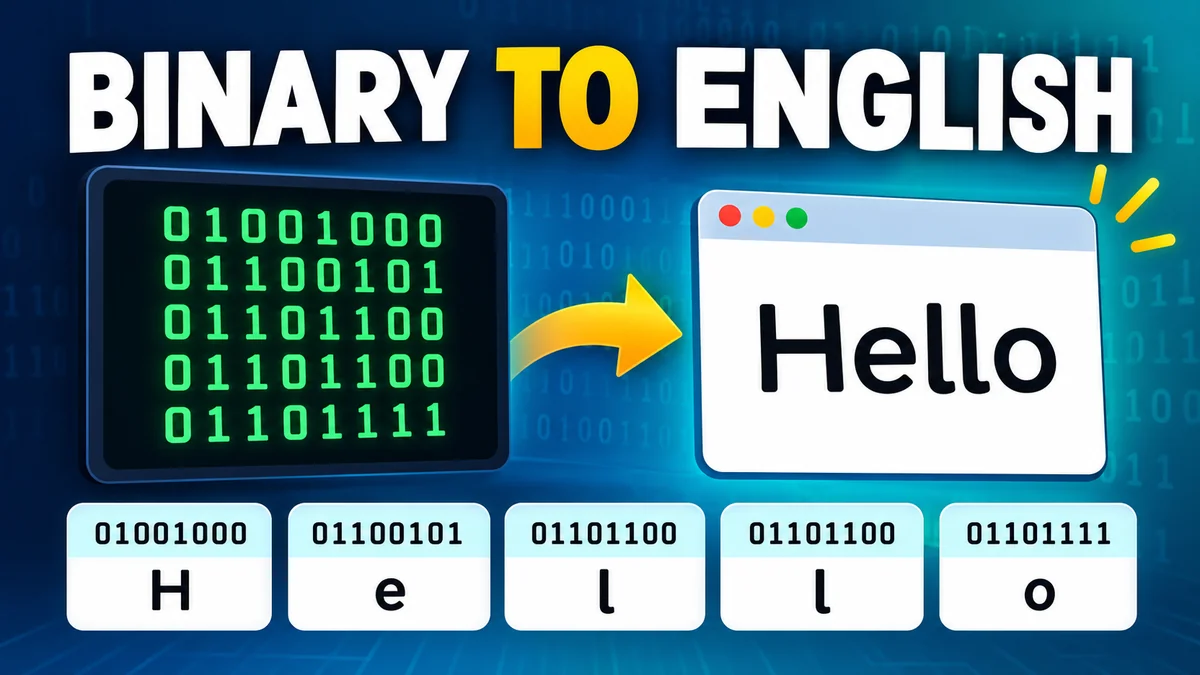
A string of zeros and ones might look like a secret message, but it can represent ordinary English words. Computers store and process text using binary data, and with the right character encoding, you can turn that data back into readable language.
Binary to English conversion is the process of decoding binary digits into letters, numbers, punctuation, and other characters using encoding standards such as ASCII and UTF-8. For example, the binary sequence 01001000 01101001 translates to “Hi” when interpreted as ASCII text.
Understanding how this works is useful for students learning computer science, programmers debugging data, and anyone curious about digital communication.
What Is Binary Code and How Does It Represent English?
Binary is a base-2 number system that uses only two digits: 0 and 1. Each binary digit is called a bit, the smallest unit of digital information.
Unlike the decimal system, which uses ten digits (0–9), binary represents numerical values using powers of two.
For example:
0represents zero.1represents one.10represents two.11represents three.100represents four.101represents five.
Computers use binary because digital circuits can reliably represent two logical states, commonly described as off and on.
However, binary digits do not automatically represent English letters. A character encoding system is needed to connect numerical values with readable characters.
How computers turn binary into letters
Each character is assigned a numerical value under a particular encoding standard.
For example, in ASCII:
| Character | Decimal Value | 8-Bit Binary |
|---|---|---|
| A | 65 | 01000001 |
| B | 66 | 01000010 |
| C | 67 | 01000011 |
| a | 97 | 01100001 |
| b | 98 | 01100010 |
| Space | 32 | 00100000 |
| ! | 33 | 00100001 |
When a computer encounters 01000001 as an ASCII-encoded character, it interprets the value 65 as the uppercase letter A.
The same binary value could represent something different if interpreted as a number, part of an image, or another kind of data. Context and encoding determine its meaning.
How to Convert binary to english Step by Step
Converting binary into text is straightforward when the input uses standard 8-bit ASCII characters.
Consider this binary sequence:
01001000
01100101
01101100
01101100
01101111
It represents the word “Hello.”
Step 1: Divide the binary sequence into bytes
A byte consists of eight bits.
Separate the sequence into groups of eight:
01001000
01100101
01101100
01101100
01101111If the binary code already contains spaces between bytes, this step is easier.
For an uninterrupted sequence, count eight digits at a time from the beginning, assuming the data is byte-aligned.
Step 2: Convert each binary byte to decimal
Every position in an 8-bit binary number corresponds to a power of two.
Binary place values
128
64
32
16
8
4
2
1
0
1
0
0
1
0
0
0
For 01001000, the active positions are 64 and 8.
\[ 64+8=72 \]
Decimal 72 represents uppercase H in ASCII.
Repeat this calculation for each byte.
| Binary | Decimal | Character |
|---|---|---|
| 01001000 | 72 | H |
| 01100101 | 101 | e |
| 01101100 | 108 | l |
| 01101100 | 108 | l |
| 01101111 | 111 | o |
Step 3: Match the values to characters
Look up each decimal number in an ASCII character table.
The resulting characters are H, e, l, l, and o.
Step 4: Combine the characters
Read the characters in their original order:
Hello
This process works for ordinary English letters, digits, spaces, and punctuation encoded in ASCII-compatible bytes.
For more complex text containing emoji, accented characters, or characters from other writing systems, UTF-8 decoding is usually required.
Binary to English Converter: Try an Example
You can practice decoding binary text with this interactive converter. It supports standard ASCII and valid UTF-8 binary sequences.
Binary to text decoder
ASCII / UTF-801001000 01100101 01101100 01101100 01101111
Load exampleClear
Decoded English text Copy
Hello
Spaces and line breaks between binary digits are ignored. The input is interpreted as UTF-8, which also supports ASCII text.
For example, entering 01000011 01100001 01110100 produces “Cat.” You can also enter multiple words, provided the spaces between words are encoded as binary characters.
ASCII vs. UTF-8: Which Encoding Is Used for Binary to English?
ASCII and UTF-8 are two important character encoding systems. Both can represent English text, but they differ in the number of characters they support.
ASCII encoding
ASCII stands for American Standard Code for Information Interchange.
It was developed to standardize the representation of letters, numbers, punctuation marks, and control characters across computer systems.
Standard ASCII uses seven bits and defines 128 character values, numbered 0 through 127. These values are commonly stored in eight-bit bytes with a leading zero.
MDN+1
ASCII includes:
- Uppercase English letters A–Z.
- Lowercase English letters a–z.
- Digits 0–9.
- Common punctuation marks.
- Spaces, tabs, and line breaks.
- Control characters used in text processing.
For example, uppercase A has decimal value 65, while lowercase a has decimal value 97.
That difference matters because binary encoding is case-sensitive.
UTF-8 encoding
UTF-8 is a Unicode encoding format that supports characters from many languages, mathematical symbols, and emoji.
It uses one to four bytes per Unicode character and preserves the original ASCII values for the first 128 characters.
UTF-8, UTF-16, UTF-32 & BOM+1
| Feature | ASCII | UTF-8 |
|---|---|---|
| Character support | 128 values | Unicode characters |
| Encoding length | 7 bits | 1–4 bytes |
| English alphabet | Yes | Yes |
| Accented letters | No | Yes |
| Emoji | No | Yes |
| ASCII compatibility | Native | Fully compatible |
| Modern web usage | Legacy/basic text | Widely used |
For simple English text, ASCII and UTF-8 produce identical binary representations.
For example, the word “Hi” is encoded as:
01001000 01101001
This is valid under both standards.
However, the accented character é requires two bytes in UTF-8:
11000011 10101001
A decoder that assumes each byte represents a separate ASCII character cannot interpret this sequence correctly.
Binary Alphabet Chart: A to Z
A binary alphabet chart helps you decode individual letters without calculating each decimal value manually.
Uppercase English letters
| Letter | Binary | Letter | Binary |
|---|---|---|---|
| A | 01000001 | N | 01001110 |
| B | 01000010 | O | 01001111 |
| C | 01000011 | P | 01010000 |
| D | 01000100 | Q | 01010001 |
| E | 01000101 | R | 01010010 |
| F | 01000110 | S | 01010011 |
| G | 01000111 | T | 01010100 |
| H | 01001000 | U | 01010101 |
| I | 01001001 | V | 01010110 |
| J | 01001010 | W | 01010111 |
| K | 01001011 | X | 01011000 |
| L | 01001100 | Y | 01011001 |
| M | 01001101 | Z | 01011010 |
Uppercase English letters occupy decimal values 65–90 in ASCII.
Notice how their binary representations increase sequentially. Once you understand the pattern, identifying neighboring letters becomes easier.
Lowercase English letters
| Letter | Binary | Letter | Binary |
|---|---|---|---|
| a | 01100001 | n | 01101110 |
| b | 01100010 | o | 01101111 |
| c | 01100011 | p | 01110000 |
| d | 01100100 | q | 01110001 |
| e | 01100101 | r | 01110010 |
| f | 01100110 | s | 01110011 |
| g | 01100111 | t | 01110100 |
| h | 01101000 | u | 01110101 |
| i | 01101001 | v | 01110110 |
| j | 01101010 | w | 01110111 |
| k | 01101011 | x | 01111000 |
| l | 01101100 | y | 01111001 |
| m | 01101101 | z | 01111010 |
Lowercase letters occupy decimal values 97–122.
The decimal difference between corresponding uppercase and lowercase ASCII letters is 32.
For example:
- A = 65 and a = 97.
- B = 66 and b = 98.
- Z = 90 and z = 122.
This relationship can be useful when learning character manipulation in programming.
Common Binary to English Conversion Examples
Seeing complete words decoded makes binary easier to understand.
Example 1: Binary code for Hello
01001000 = H
01100101 = e
01101100 = l
01101100 = l
01101111 = o
Decoded result: Hello
Example 2: Binary code for Love
01001100 = L
01101111 = o
01110110 = v
01100101 = e
Decoded result: Love
Example 3: Binary code for Hello World
01001000 01100101 01101100 01101100 01101111
00100000
01010111 01101111 01110010 01101100 01100100
Decoded result: Hello World
The byte 00100000 represents a space.
Without it, the decoded result would be “HelloWorld.”
Example 4: Binary code for SOS
01010011 = S
01001111 = O
01010011 = S
Decoded result: SOS
This is an ASCII representation of the letters S, O, and S. It should not be confused with the Morse code distress signal, which uses dots and dashes.
Example 5: Binary numbers and punctuation
Digits and punctuation also have character codes.
| Character | Binary |
|---|---|
| 0 | 00110000 |
| 1 | 00110001 |
| 2 | 00110010 |
| 3 | 00110011 |
| 4 | 00110100 |
| 5 | 00110101 |
| 6 | 00110110 |
| 7 | 00110111 |
| 8 | 00111000 |
| 9 | 00111001 |
| ! | 00100001 |
| ? | 00111111 |
| . | 00101110 |
| Space | 00100000 |
An important distinction is that the binary representation of the numerical value 5 is 101, while the ASCII character “5” is represented as 00110101.
The first is a number; the second is encoded text.
How to Convert English Text Back Into Binary
Text-to-binary conversion reverses the decoding process.
Instead of starting with bits, you begin with readable characters and determine their corresponding binary representations.
For example, converting the word “CAT” involves identifying the ASCII value of each letter.
| Character | ASCII Decimal | Binary |
|---|---|---|
| C | 67 | 01000011 |
| A | 65 | 01000001 |
| T | 84 | 01010100 |
The final binary representation is:
01000011 01000001 01010100
Converting text to binary automatically
For longer messages, an encoder is more practical than converting every letter manually.
A basic text-to-binary algorithm follows these steps:
- Read the original text.
- Encode it into bytes using UTF-8.
- Convert each byte into an eight-bit binary representation.
- Join the binary groups in their original order.
For example, Python provides a simple way to perform this conversion:
text = "Hello"binary = " ".join( format(byte, "08b") for byte in text.encode("utf-8"))print(binary)Output:
01001000 01100101 01101100 01101100 01101111The encode("utf-8") method converts the string into bytes, and format(byte, "08b") formats each byte as an eight-digit binary number.
To decode binary back into text:
binary = "01001000 01101001"data = bytes( int(group, 2) for group in binary.split())print(data.decode("utf-8"))Output:
HiFor this example, spaces separate the bytes. A continuous binary string would need to be divided into eight-bit groups before decoding.
Why Binary to English Conversion Sometimes Fails
Not every binary sequence can be translated directly into readable English.
Incorrect formatting, missing bits, incompatible encodings, and non-text data can all cause unexpected results.
1. Missing or extra binary digits
A typical byte-based decoder expects complete groups of eight bits.
For example:
0100100
This sequence contains only seven bits.
It could be a seven-bit ASCII value, but a decoder expecting eight-bit bytes may reject it.
If the intended byte was 01001000, the missing digit changes how the data should be interpreted.
Solution: Check the expected bit length and confirm whether the original data uses seven-bit ASCII, eight-bit bytes, or another format.
2. Using the wrong character encoding
The same bytes can produce different characters under different encodings.
For instance, the byte 11101001 corresponds to é in ISO-8859-1 (Latin-1), but it is not a complete valid UTF-8 character sequence.
A UTF-8 decoder may report an error instead of displaying a character.
Solution: Identify the original encoding before decoding. Common possibilities include UTF-8, ASCII, ISO-8859-1, Windows-1252, and UTF-16.
3. Binary data is not actually text
A binary sequence may represent an image, audio recording, compressed file, executable program, or numerical measurement.
Trying to interpret such data as text can produce unreadable symbols.
This does not necessarily mean the data is damaged. It may simply be interpreted using the wrong format.
4. Spaces are interpreted incorrectly
Spaces between binary groups are often visual separators added for readability.
They are different from an encoded space character.
Consider:
01001000 01101001
The gap between the two groups separates the bytes. It does not represent a space in the decoded message.
To encode “H i” with a space between the letters, the correct sequence is:
01001000 00100000 01101001
5. Confusing binary with hexadecimal or Base64
Binary, hexadecimal, and Base64 are different ways of representing data.
Binary uses zeros and ones, while hexadecimal uses digits 0–9 and letters A–F. Base64 uses a larger alphabet to represent binary data as printable text.
A hexadecimal string such as 48 69 cannot be decoded correctly by simply treating it as binary digits.
First identify the representation, then apply the appropriate conversion.
Where Is Binary to English Conversion Used?
Although most people never manually decode binary during everyday computer use, the underlying process is essential to digital technology.
Computer programming
Programming languages work with strings, characters, bytes, and character encodings.
Developers may inspect binary representations when troubleshooting file handling, character corruption, or data-processing errors.
For example, a Python programmer might examine encoded bytes to understand why a particular character is not displaying correctly.
Networking and data transmission
Computers exchange information across networks as sequences of bits.
Protocols such as TCP/IP transmit data between devices, while application protocols and data formats define how that information should be interpreted.
Text transferred through an HTTP connection, for example, may use UTF-8 encoding.
Understanding bytes and character encodings helps explain how text moves between applications.
Cybersecurity and digital forensics
Security researchers and digital forensic analysts sometimes inspect binary and hexadecimal data when analyzing files, network traffic, or encoded messages.
Recognizing ASCII patterns can help identify readable strings inside larger datasets.
However, converting binary to text is decoding, not necessarily decrypting. Encryption requires the appropriate cryptographic method and usually a key.
Computer science education
Binary conversion is a foundational topic in computing courses.
It connects several important concepts, including number systems, positional notation, character encoding, digital logic, and data representation.
Working through conversions manually helps students understand how readable text can be represented numerically.
Data storage and file formats
Text files store character data as bytes according to an encoding.
A plain-text file containing “ABC” in UTF-8 stores the byte values 65, 66, and 67.
In binary notation, those values are:
01000001 01000010 01000011
The operating system and text editor interpret those bytes to display the original characters.
Tips for Reading Binary Code Faster
Manual binary decoding becomes easier once you recognize common patterns.
First, memorize a few frequently used ASCII values. Uppercase A is 65, lowercase a is 97, and the space character is 32.
Next, learn the binary place values: 128, 64, 32, 16, 8, 4, 2, and 1. These allow you to calculate any eight-bit value through addition.
You can also recognize common prefixes. Uppercase English letters begin with 010, lowercase letters begin with 011, and ASCII digits begin with 0011.
Finally, practice with short words before attempting complete sentences. Decode a familiar word manually, then verify it using a binary translator.
A particularly useful habit is checking the encoding whenever the result contains unexpected symbols. Correct byte grouping alone cannot fix an encoding mismatch.
Is Binary Code the Same as Machine Language?
Binary code and machine language are related, but they are not interchangeable terms.
Binary is a number system and a way of representing information using bits.
Machine language consists of instructions that a processor can execute. Those instructions are stored as binary patterns defined by the processor’s instruction set architecture, such as x86-64 or ARM.
The same sequence of bits might represent a number, a character, or part of a machine instruction depending on its context.
For example, 01000001 can represent decimal 65 or the ASCII letter A. In another context, the byte could form part of a processor instruction.
This distinction explains why a binary-to-text converter cannot automatically translate arbitrary machine code into meaningful English sentences.
Can Binary Represent Languages Other Than English?
Yes. Binary can represent text from virtually any modern writing system when an appropriate character encoding is used.
Unicode assigns code points to characters from numerous languages and scripts. UTF-8 then encodes those code points into byte sequences.
For example, the character € is represented in UTF-8 by:
11100010 10000010 10101100
Each eight-bit group represents one byte, but all three bytes together encode a single character.
Many emoji similarly require four UTF-8 bytes.
This is why the assumption that one byte always equals one character is incorrect for modern multilingual text.
ASCII remains useful for understanding basic English encoding, while Unicode and UTF-8 provide the broader framework used by contemporary applications.
Conclusion: Understanding binary to english Conversion
Learning binary to english conversion reveals how computers represent readable text using numerical data.
The basic process involves separating binary into bytes, converting those bytes into numerical values, and interpreting them with the correct character encoding.
For ordinary English text, ASCII provides a simple starting point. For multilingual text, special symbols, and emoji, UTF-8 offers much broader support.
Start by practicing with short words such as “Hi,” “Cat,” and “Hello.” Once you understand eight-bit place values and ASCII character codes, decoding longer messages becomes considerably easier.
The central principle is simple: binary digits carry the data, while character encoding determines how that data becomes readable text.
