

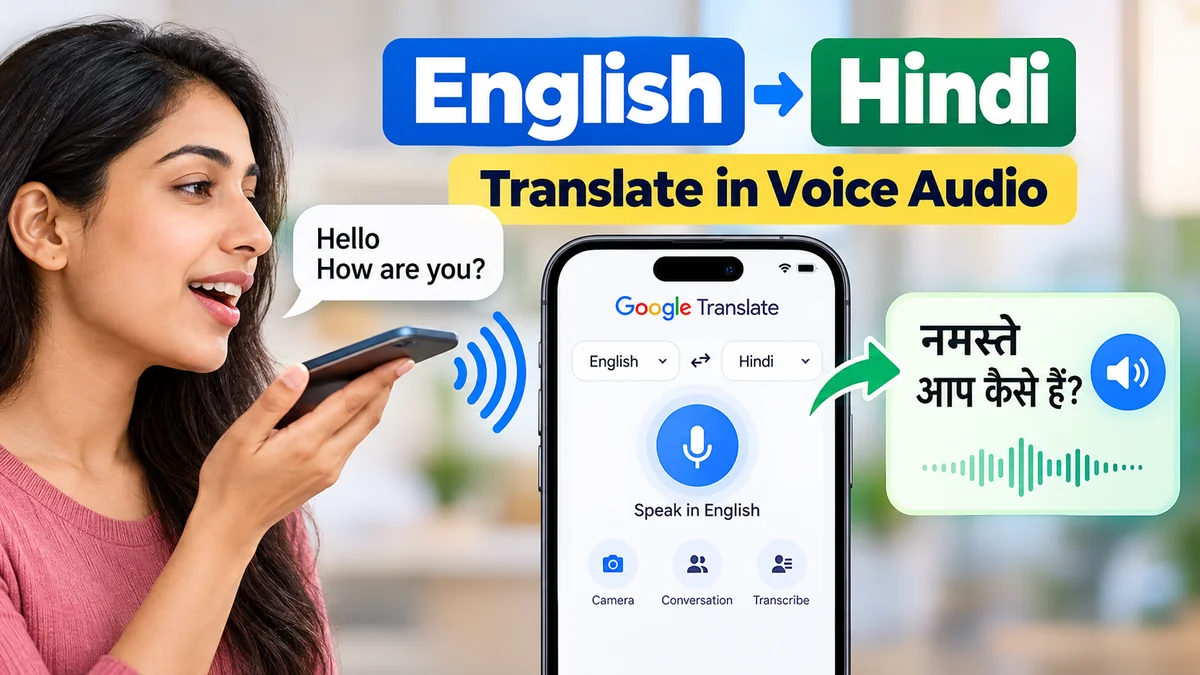
Speaking English and hearing the same message in Hindi can make conversations much easier. You no longer need to type every sentence, copy translated text, or struggle with unfamiliar Hindi pronunciation.
With modern voice translation tools, you can speak into your phone, convert English speech into Hindi text, and listen to the Hindi translation aloud.
English to Hindi voice translation converts spoken English into Hindi text or spoken Hindi audio using speech recognition, machine translation, and text-to-speech technology. Tools such as Google Translate allow users to speak English, view a Hindi translation, and hear its pronunciation. Some applications also support real-time bilingual conversations.
This guide explains how voice translation works, which tools support it, how to translate English audio into Hindi, and how to improve translation accuracy.
How Does english to hindi translate in voice audio Work?
English-to-Hindi voice translation combines three technologies to convert spoken language into understandable Hindi.
1. Speech Recognition
Automatic speech recognition (ASR) identifies the words spoken into a microphone and converts them into written text.
For example, you say:
English: “Where is the nearest railway station?”
The application first recognizes those English words.
2. Machine Translation
The translation engine analyzes the recognized sentence and converts its meaning into Hindi.
Hindi: निकटतम रेलवे स्टेशन कहाँ है?
Modern neural machine translation systems consider sentence context rather than simply replacing individual English words with Hindi equivalents.
3. Text-to-Speech Conversion
Text-to-speech (TTS) technology converts the translated Hindi sentence into spoken audio.
The application plays the Hindi pronunciation through your phone speaker, headphones, or another connected audio device.
This process allows users to communicate without needing to read or pronounce Hindi themselves.
How to Translate English to Hindi Using Google Translate Voice
Google Translate is one of the most accessible tools for translating English speech into Hindi.


7
Step-by-Step Instructions on Android and iPhone
- Open the Google Translate application on your smartphone.
- Select English as the source language.
- Select Hindi as the target language.
- Tap the microphone icon.
- Speak clearly in English.
- Wait for the application to recognize your speech and display the Hindi translation.
- Tap the speaker icon to hear the translated Hindi audio.
For example:
| Spoken English | Hindi translation |
|---|---|
| How are you? | आप कैसे हैं? |
| What is your name? | आपका नाम क्या है? |
| I need some water. | मुझे थोड़ा पानी चाहिए। |
| Please help me. | कृपया मेरी मदद करें। |
| How much does this cost? | इसकी कीमत कितनी है? |
| I am learning Hindi. | मैं हिंदी सीख रहा हूँ। |
The final sentence uses a masculine speaker form. A female speaker would commonly say “मैं हिंदी सीख रही हूँ।”
How to Use Conversation Mode
Google Translate also offers conversation features for communication between people speaking different languages.
Open the application, choose English and Hindi, and select the conversation feature where available. Speak in English, allow the app to translate, and let the other person respond in Hindi.
The application can help translate the response back into English.
Conversation mode is particularly useful for travelers, customer interactions, and everyday communication. However, speech recognition errors, background noise, and translation delays can interrupt the conversation.
Best Tools for English to Hindi Voice Translation
Several applications and services provide speech translation, Hindi audio playback, or voice transcription.
| Tool | Main capability | Useful for |
|---|---|---|
| Google Translate | Speech input, Hindi translation, audio playback | Everyday translation |
| Microsoft Translator | Speech translation and conversation features | Multilingual communication |
| Google Assistant or Gemini | Voice interaction and language assistance | Spoken language questions |
| Google Docs Voice Typing | Speech-to-text transcription | Preparing text for translation |
| Google Cloud Translation and Text-to-Speech | Translation and synthesized speech through APIs | Developer workflows |
Google Translate
Google Translate combines text translation, speech recognition, and translated audio playback in a relatively straightforward interface.
It is suitable for short sentences, travel phrases, and conversational Hindi. Features and offline capabilities can vary by platform and language.
Microsoft Translator
Microsoft Translator supports multilingual translation and speech-related features on supported platforms.
It can be useful for communication between people who speak different languages. Users should check the current app version for available Hindi speech features.
Google Assistant and Gemini
Voice assistants and AI applications can help explain Hindi phrases, suggest translations, and provide conversational language practice.
However, their output should not automatically be treated as a verified translation. For precise wording, compare the result with a dedicated translation service.
Google Docs Voice Typing
Google Docs offers voice typing, which can convert spoken English into text.
It does not, by itself, perform the entire speech-to-Hindi-audio translation workflow. The transcribed text must be translated and spoken using another compatible tool.
How to Translate English Voice to Hindi Audio Online
You can perform English-to-Hindi voice translation directly through a web browser without necessarily installing a dedicated application.
Using Google Translate on a Computer
- Visit Google Translate.
- Select English as the input language.
- Select Hindi as the output language.
- Use the microphone option if supported by your browser and device.
- Speak your English sentence.
- Review the Hindi translation.
- Select the audio playback icon to listen to the Hindi result.
If microphone input is unavailable, use your operating system’s voice dictation feature to enter English text into the translation field.
Browser and Microphone Requirements
Voice translation depends on microphone access and compatible browser features.
Check that your microphone is connected, the browser has permission to use it, and the correct audio input device is selected.
Chrome, Edge, Safari, and other browsers may offer different speech-input capabilities depending on the operating system.
For a more reliable experience, use a supported mobile translation app when browser microphone functionality is limited.
Can You Translate English to Hindi Voice in Real Time?
Yes. Real-time speech translation allows one person to speak English while another listens to the Hindi translation.
Google Translate’s Live Translate feature supports English and Hindi, with options for listening, conversation, and text-only translation. Available modes depend on the device and app version.
Google Translate Help
+1
Translating Live Conversations
To use real-time translation:
- Open the latest Google Translate application.
- Select English and Hindi.
- Tap Live Translate.
- Choose Conversation mode.
- Start speaking English.
- Allow the translated Hindi speech to play through the phone speaker.
In supported modes, the application can recognize when speakers switch languages, reducing the need to manually change language settings.
Using Headphones for Hindi Translation
Headphones can make translated audio easier to understand in noisy environments.
For example, an English-speaking presenter may be giving instructions while a Hindi-speaking listener uses a compatible translation feature to hear those instructions in Hindi.
Live Translate offers listening through headphones on supported devices. Availability and functionality can differ between Android and iOS.
Google Translate Help
+1
How to Convert English Audio Recordings into Hindi
Translating a recorded audio file is different from translating speech directly through a microphone.
A voice translator typically listens to live microphone input. An audio-file translation workflow processes an existing recording, such as an MP3, WAV, podcast, or voice message.
Translating a Recorded English Voice Message
A practical workflow involves four stages:
- Transcribe the recording: Use speech-to-text software to convert the English recording into written text.
- Review the transcription: Correct names, technical terms, and words the software misunderstood.
- Translate the text: Convert the corrected English transcript into Hindi.
- Generate Hindi speech: Use a Hindi text-to-speech application to create spoken audio.
For example, an English recording says:
“I will arrive at the office at nine tomorrow morning.”
The Hindi translation could be:
“मैं कल सुबह नौ बजे कार्यालय पहुँचूँगा।”
This is a masculine form. A female speaker would normally use “पहुँचूँगी।”
The translated sentence can then be played using Hindi text-to-speech technology.
Can You Translate MP3 Files Directly?
Some specialized audio translation and dubbing services accept uploaded recordings, but Google Translate’s ordinary microphone feature is not a general-purpose MP3 file uploader.
For longer recordings, dedicated transcription and dubbing software may be more appropriate.
Keep in mind that automatic dubbing may not reproduce the original speaker’s voice, emotional expression, or exact timing.
Translating English Videos into Hindi Audio
Video translation adds another step because translated speech must align with the video.
The usual process involves extracting or transcribing the original speech, translating the transcript, generating Hindi narration, and synchronizing the new audio with the video.
Subtitles and dubbed audio are different outputs. Subtitles display translated text, while dubbing replaces or supplements the original spoken soundtrack.
For educational videos, accurate terminology matters more than matching every word literally.
Can English to Hindi Voice Translation Work Offline?
Some translation applications support downloaded language packs, allowing certain translation functions to work without an internet connection.
However, offline text translation and offline speech-to-speech translation are not necessarily the same feature.
Google currently documents offline Live Translate for certain Pixel devices, including supported English–Hindi language pairs. This does not mean every Android or iPhone device can perform offline Hindi voice translation.
Google Translate Help
Online vs. Offline Translation
| Feature | Online translation | Offline translation |
|---|---|---|
| Internet required | Yes | Not for supported downloaded features |
| English-to-Hindi text | Supported | Depends on language pack |
| Voice recognition | Generally available | Device and feature dependent |
| Spoken Hindi output | Supported | May be limited |
| Live conversations | Supported on compatible devices | More restricted |
| Updates | Can use online services | May require updated downloads |
Before traveling without internet access, test the exact translation feature you plan to use in airplane mode.
Downloading Hindi and English language data does not guarantee that every voice feature will work offline.
How to Improve English to Hindi Voice Translation Accuracy
Speech translation can be remarkably useful, but its accuracy depends on the recording environment, pronunciation, sentence structure, and translation context.
Speak in Complete, Clear Sentences
Use natural sentences rather than disconnected words.
For example, instead of saying “station ticket tomorrow two,” say “I need two train tickets for tomorrow.”
The second sentence gives the translation engine enough context to produce a more meaningful Hindi translation.
Reduce Background Noise
Traffic, music, television audio, and nearby conversations can interfere with speech recognition.
For clearer results, hold the microphone at a comfortable distance, speak at a moderate pace, and avoid speaking over another person.
Check Names and Numbers
Proper nouns, dates, addresses, and numbers are common sources of translation mistakes.
A street name may be mistaken for an ordinary English word. Similarly, fifteen and fifty can be confused if speech recognition is poor.
Always review important details before relying on a translation.
Understand Formal and Informal Hindi
English does not always distinguish between formal and informal ways of addressing someone, but Hindi does.
For example:
| English | Hindi | Usage |
|---|---|---|
| How are you? | आप कैसे हैं? | Respectful or formal |
| How are you? | तुम कैसे हो? | Informal |
| Please sit down. | कृपया बैठिए। | Polite |
| Sit down. | बैठो। | Informal |
The appropriate wording depends on the relationship between the speakers and the situation.
A machine translation may be grammatically correct but still sound too formal or too casual.
Be Careful With Gendered Expressions
Hindi frequently uses grammatical forms that depend on gender.
For example, “I am going” may be translated as:
- Masculine: मैं जा रहा हूँ।
- Feminine: मैं जा रही हूँ।
English does not communicate this distinction in the original sentence.
If the translation tool lacks enough context, it may choose a form that does not match the speaker.
Common English to Hindi Voice Translation Problems
Even reliable translation applications occasionally experience microphone errors, missing audio playback, or inaccurate results.
Microphone Not Working
If the application cannot hear your voice, check its microphone permissions.
On Android or iPhone, open the device settings, locate the application, and confirm that microphone access is enabled.
Also check whether another application is using the microphone.
Hindi Translation Has No Sound
If translated text appears but no audio plays, check the media volume and connected Bluetooth devices.
Some applications include a separate speaker icon for translated speech. You may need to tap it manually.
Google Translate also provides speech-output and playback-speed settings on supported platforms.
Google Translate Help
Wrong Language Is Detected
Automatic language detection can struggle with short phrases, mixed languages, and regional accents.
Manually selecting English as the source language often improves consistency.
This is especially useful when English speech includes Hindi words, place names, or expressions commonly used in India.
Translation Sounds Unnatural
Machine translation sometimes produces overly literal Hindi.
For instance, an English idiom may require a completely different expression in Hindi to communicate the intended meaning.
If the output sounds unnatural, try rephrasing the English sentence in simpler language.
Translation Stops During Long Speech
Short-speech translation tools may stop listening after a pause or a completed sentence.
For lectures, interviews, and longer conversations, use a compatible continuous transcription or Live Translate feature rather than repeatedly recording individual sentences.
Benefits and Limitations of English to Hindi Audio Translation
Voice translation can support communication in many situations, but it should be treated as an assistance tool rather than a flawless human interpreter.
Everyday Communication
People who understand Hindi better than English can listen to translated instructions, directions, and everyday questions.
Spoken translation can also help when reading small text on a phone is inconvenient.
Language Learning
English learners and Hindi learners can compare the original sentence with its translated version.
Listening to Hindi audio helps with pronunciation, rhythm, and sentence patterns.
For better learning results, repeat the translated sentence and compare it with the written Devanagari text.
Travel and Public Services
Voice translation is useful for asking directions, understanding transportation information, or communicating basic requests.
However, important travel details such as ticket dates, destination names, and payment amounts should be confirmed visually.
Education and Accessibility
Students can use translated audio to understand unfamiliar vocabulary and basic explanations.
Audio playback can also assist users who find written Hindi difficult to read.
The limitations become more significant with technical lectures, specialized terminology, and lengthy explanations.
Medical, Legal, and Emergency Communication
Automated translation can help communicate simple information, but errors may have serious consequences in medical, legal, or emergency situations.
A qualified interpreter should be used whenever accurate understanding is essential.
Never rely solely on an unverified voice translation for medication instructions, legal consent, or emergency decisions.
English to Hindi Voice Translation: Practical Examples
The following sentences demonstrate how common English expressions translate into Hindi.
| English sentence | Hindi translation |
|---|---|
| Good morning. | सुप्रभात। |
| Where are you going? | आप कहाँ जा रहे हैं? |
| Please speak slowly. | कृपया धीरे बोलिए। |
| I do not understand. | मुझे समझ नहीं आ रहा है। |
| Can you repeat that? | क्या आप इसे दोहरा सकते हैं? |
| Where is the hospital? | अस्पताल कहाँ है? |
| I need your help. | मुझे आपकी मदद चाहिए। |
| Please call me tomorrow. | कृपया मुझे कल फोन कीजिए। |
| What time is the meeting? | बैठक कितने बजे है? |
| Thank you very much. | आपका बहुत-बहुत धन्यवाद। |
Some translations can change depending on gender, formality, and context. For instance, “आप कहाँ जा रहे हैं?” addresses a male person or a group, while “आप कहाँ जा रही हैं?” addresses a female person.
Listening to these sentences in a translation application can help learners associate written Hindi with spoken pronunciation.
How to Listen to Hindi Translations More Clearly
If your main goal is understanding spoken Hindi, rather than simply reading translated text, audio settings deserve attention.
Google Translate allows users to adjust playback speed on supported devices, including slower speech options.
Google Translate Help
Slower playback can help learners distinguish individual Hindi words, particularly when a sentence contains unfamiliar vocabulary.
For pronunciation practice, follow a simple routine: listen to the Hindi translation at normal speed, replay it slowly, read the written sentence, and repeat the audio aloud.
This approach combines listening, reading, and speaking practice.
It is also useful to remember that synthesized Hindi speech may not capture every regional accent or conversational variation. Standard pronunciation is helpful for learning, but everyday spoken Hindi can sound different across regions.
Final Thoughts on english to hindi translate in voice audio
Using english to hindi translate in voice audio is a convenient way to understand spoken English in Hindi without manually typing and translating every sentence.
For most everyday situations, Google Translate offers a straightforward starting point through microphone input, Hindi text translation, audio playback, and supported live conversation features.
For recorded audio, a transcription-to-translation-to-speech workflow may be necessary. For offline use, verify device compatibility and test the feature beforehand.
The most effective approach is to speak clearly, review important translations, and use audio playback to check pronunciation. With those habits, English-to-Hindi voice translation becomes a practical tool for communication, education, travel, and language learning.
